The wait is finally over! GTA 6 is soon going to be here, and the hype is absolutely electric.
Whether you’re a seasoned veteran of Los Santos or a newcomer ready to explore Leonida, there’s nothing quite like the thrill of experiencing a brand-new Rockstar masterpiece.
But why play alone when you can share every explosive moment, high-speed chase, and sun-soaked sunset with a live community?
Note: Till now, GTA 6 is set to release only on PS5 and Xbox Series X/S on November 19, 2026. There is no official announcement for PC.
Can I Stream GTA 6 on Twitch?
Yes, you absolutely can stream GTA 6 on Twitch. Since the game is launching on consoles, the easiest way to jump into streaming is by linking your Twitch account directly to your PlayStation 5 or Xbox Series X/S.
It’s a straightforward process that lets you broadcast your gameplay directly to your channel without needing a complicated setup.
Game Streaming Is a Billion-Dollar Opportunity
The global game-streaming market was worth about $12 billion in 2025 and is expected to reach $31.63 billion by 2033. The wider global games market generated about $188.8 billion in 2025. These numbers show the large business opportunity around gaming content. GTA 6 could give streamers a fresh chance to attract viewers through gameplay, guides, reactions, challenges, and live events.
How to Stream GTA 6 on Twitch using PS5
Follow the simple steps to stream GTA 6 on Twitch using a PS5.
1. Link Your Twitch Account
- From your PS5 dashboard, go to the top right and select Settings.
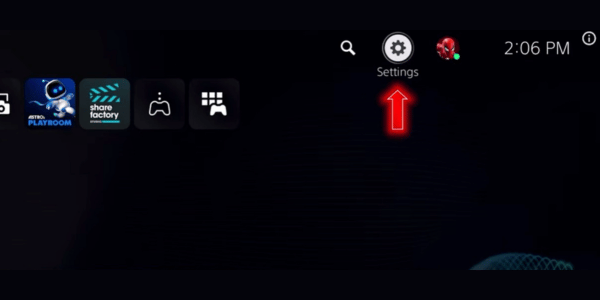
- Navigate down to Users and Accounts.
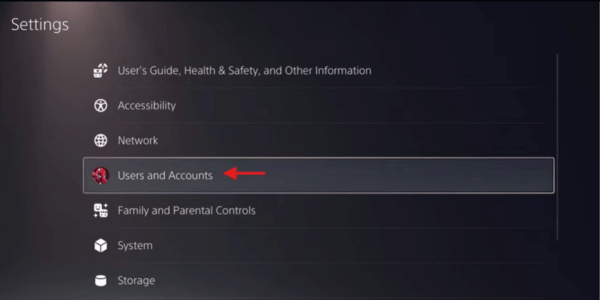
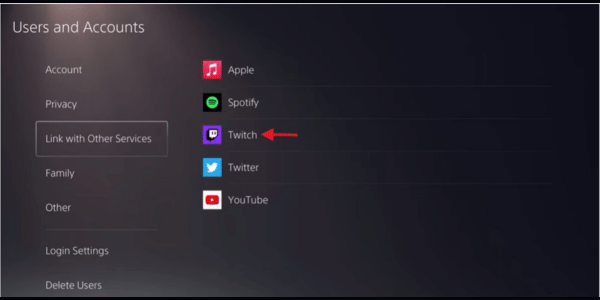
- Select Link with Other Services and choose Twitch.
- You will be prompted to either visit www.twitch.tv/activate on a web browser or scan the QR code on your screen using your mobile device.
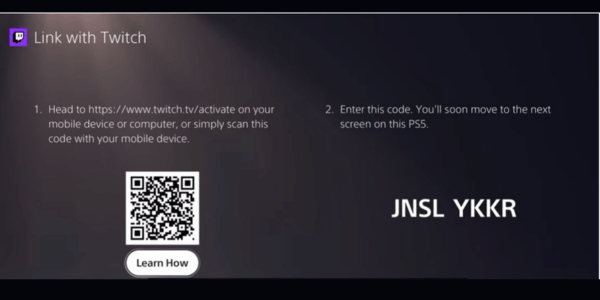
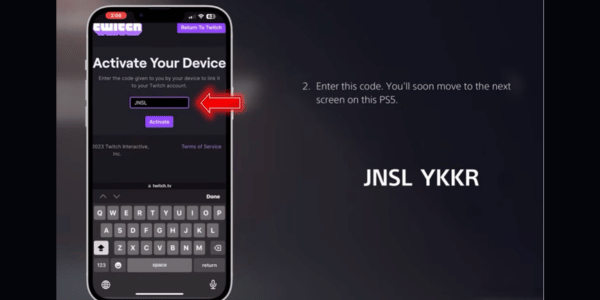
- Scanning the QR code is the easiest method; it will open the Twitch app on your phone. Hit “Activate your device” and type in the code displayed on your PS5 screen.
- Finally, hit Authorize to give PlayStation access to your Twitch account.
Step 2: Load Your Game
It is always important to load up the game before you actually start the broadcast. So, go ahead and launch GTA 6 from your dashboard.
Step 3: Setup Your Broadcast
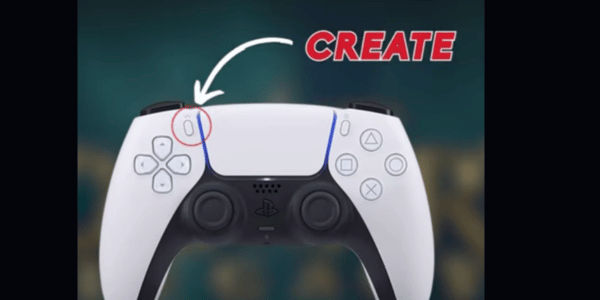
- Once in the game, press the Create button (the small top-left button above the D-pad) on your PS5 controller.
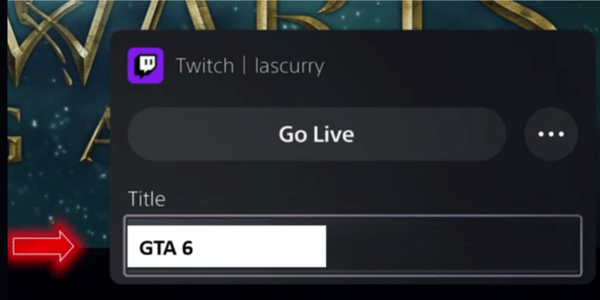
- From the menu that pops up at the bottom of the screen, scroll over and select Broadcast. Here, put the title and hit Go live. Make sure to keep your stream quality at 1920×1080 at 60 fps. You can do this from more broadcast options.
How to Stream GTA 6 on Twitch Using Xbox Series X/S
1. Update your console
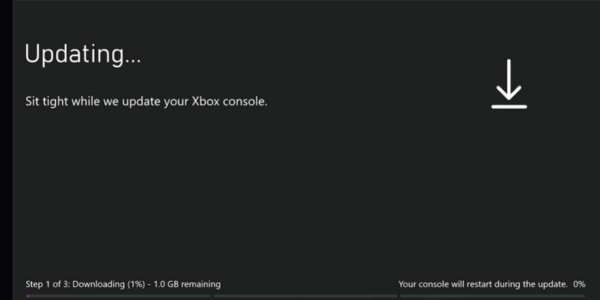
Go to your system settings and check for an update. The streaming feature requires the very latest Xbox patch to function.
2. Check your privacy settings
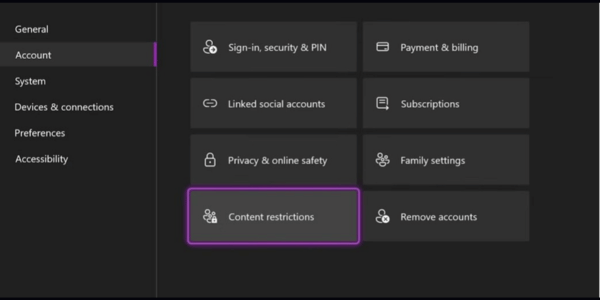
Open your account settings and verify your privacy and content restrictions. Ensure there are no parental controls active that would block you from going live.
3. Access the Live Streaming menu
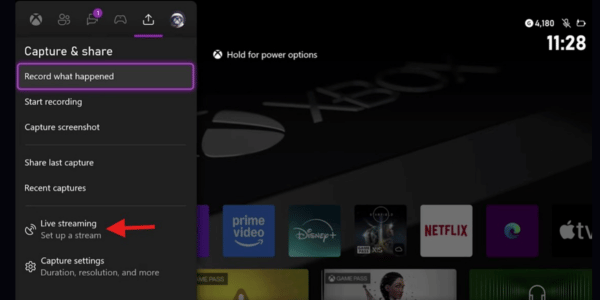
Click your avatar icon in the top left of the Xbox guide, navigate over to the fifth tab (the Capture and share section), and select Live streaming at the very bottom.
4. Link your Twitch account
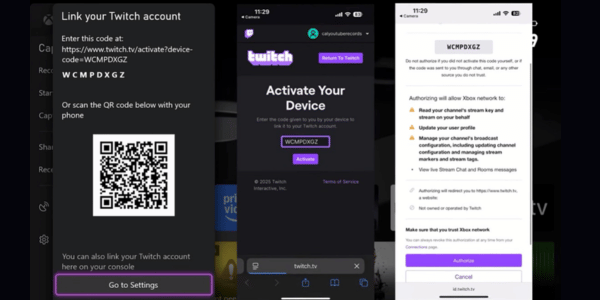
Scan the on-screen QR code with your phone or visit the provided web URL. Follow the prompts to authorize your Xbox to access your Twitch channel.
If you scan with your phone, just enter the code, click activate, and authorize. That’s it, you are good to go.
5. Configure your stream Details
Enter your stream name (e.g., “First playthrough of GTA 6!”) and toggle your microphone or camera on if you’re using them. Under More options, you can change your resolution and audio settings.
6. Go live and launch GTA 6
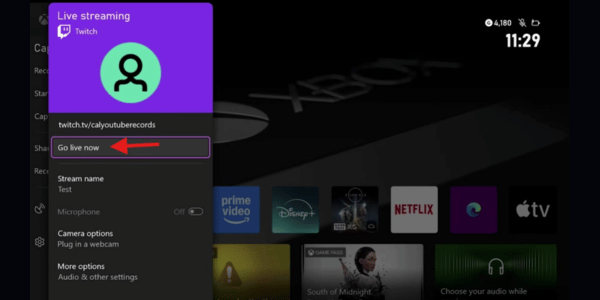
Click Go live now at the top of the menu, and then boot up the game. Don’t panic if your stream preview just shows a looping Xbox screen.
The console intentionally blocks the stream while you are in the dashboard menus to protect your private information. The stream will automatically display your gameplay as soon as GTA 6 is running.
How to Stream GTA 6 on Twitch using PC
As of now, GTA 6 is only set to release on PS5 and Xbox Series X/S, with no official PC release date.
But if it does release on PC, here is how you can stream it.
- Install & Connect: Download OBS Studio, go to Settings > Stream, select Twitch, and log in to your Twitch account directly.
- Optimize Video for Fast Action: In Settings > Video, set Output Resolution to 720p and FPS to 60. In the Output tab, set Bitrate between 4500-6000 and use the NVENC h264 encoder if you have an Nvidia card.
- Set Audio Levels: In Settings > Audio, add your microphone and desktop audio. Adjust the mixer so your mic hits around -12dB and desktop audio sits around -32dB.
- Add Sources: In the main OBS window under Sources, click ‘+’ and add a Game Capture for GTA 6, then add a Video Capture Device for your webcam.
- Update Twitch Info: Go to your Twitch Creator Dashboard to update your stream title, category (GTA 6), and tags, then hit “Start Streaming” in OBS.
How to Get More Viewers on Your GTA 6 Twitch Stream
When GTA 6 launches, Twitch will be packed with streamers trying to attract viewers.
For new creators, getting noticed can be difficult because many viewers naturally go towards larger channels. That is why building visibility early is just as important as creating great content.
Along with organic promotion, some creators also explore buying twitch viewers. FollowersPanda.com offers safe to buy viewer services for streamers who want extra support while building their channel.
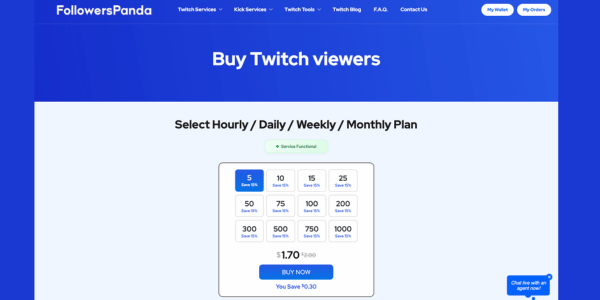
They have 24/7 live chat support, so they can help you instantly during your stream.
Paid promotion should support your wider growth plan rather than replace it. GTA 6 streamers should also:
- Create unique content such as challenge runs, speedruns, roleplay, or easter egg hunts.
- Engage actively with viewers through chat and community events.
- Post GTA 6 highlights on TikTok, YouTube Shorts, and Instagram Reels.
- Maintain a consistent streaming schedule.
- Network with other GTA creators and Twitch communities.
Combining useful content, regular promotion, and strong audience engagement can give your channel a better chance of steady growth.
FAQs
When Is GTA 6 Coming Out?
After years of rumors, leaks, and speculation, Rockstar Games has officially confirmed that Grand Theft Auto VI (GTA 6) is scheduled to launch on November 19, 2026, for PlayStation 5 and Xbox Series X|S.
What do I need to stream GTA 6 on Twitch?
To stream GTA 6 on Twitch, you’ll need:
- A Twitch account
- A PS5 or Xbox Series X|S running GTA 6
- A stable internet connection
- Streaming software such as OBS Studio or Streamlabs
- A microphone (recommended)
- A webcam (optional)
- A capture card if you’re streaming console gameplay through a PC
Twitch recommends using a video encoder such as OBS or Streamlabs to stream from a PC.
Will GTA 6 Release on PC?
Yes, GTA 6 is widely expected to release on PC, but Rockstar Games has not officially announced a PC release date yet.
Can you earn Twitch Drops while watching GTA 6 streams?
If Rockstar launches GTA 6 Twitch Drops similar to previous GTA promotions, viewers may be able to earn in-game rewards by linking their Rockstar and Twitch accounts and watching participating channels.
Can I stream GTA 6 directly from my PS5 or Xbox without a PC?
Yes. Both PlayStation 5 and Xbox Series X|S allow direct Twitch broadcasting without requiring a gaming PC.
What internet speed is recommended for streaming GTA 6 on Twitch?
For smooth GTA 6 streaming at 1080p and 60 FPS, an upload speed of at least 10 Mbps is recommended.